Example 1
Assume you have a formula =sum(A8+A9)
To copy this formula, do the following!
Change the formula as =sum($A$8 + $A$9)
Now copy and paste.
Example 2
Assume you have a formula =B3 * 5 / SUM(B4:B7)
To copy this formula, do the following!
Change the formula as =$B$3 * 5 / SUM($B$4:$B$7)
Then copy and paste.
Example 3
Assume you have a formula =COUNTIF(C2:C4,A2)
To copy this formula, do the following!
Change the formula as =COUNTIF($C$2:$C$4,$A$2)
Then copy and paste.
Showing posts with label tricks. Show all posts
Showing posts with label tricks. Show all posts
Wednesday, November 17, 2010

Tuesday, November 16, 2010
How to hide non printable characters in Ms-Word?
Press Ctrl + Shift + 8 to show or hide Non printable characters!
Note:
Press the number 8 key with * symbol.
This will almost work in all versions of MS-Word.
Note:
Press the number 8 key with * symbol.
This will almost work in all versions of MS-Word.
Wednesday, August 25, 2010
How can I post a video response in YouTube?
- Below the video, you will find a box with "Video responses".
- Click the box to get the link "Post a video response".
- Click the link (A gray menu bar will appear)
- Select "Choose a video"
(to select a video you have already uploaded)
OR
Select "Upload a video"
(to upload a video).
Wednesday, April 28, 2010
How to create your own Sleep button in XP?
- Right click on the desktop.
- Select New -> Shortcut.
- In the text box type rundll32.exe powrprof.dll,SetSuspendState
- Click Next.
- Type Sleep in the text box.
- Click Finish.
Wednesday, October 21, 2009
How to block a contact in Gmail?
- Click Contacts from the left side of Gmail.
- Select the person you'd like to block.
- Select Block from "Show in chat list" Box.
To unblock
Just select Always or Auto from the "Show in chat list" Box.
OR
Type their name in the Search, add, or invite field at the top of your Chat list. Then, in the blue box that appears, hover over your contact's name and select Show in chat list.
Friday, October 9, 2009
How can I disable Autorun?
- Click Start --> Run
- Type GPEDIT.MSC
- Go to Computer Configuration --> Administrative Templates --> System
- Locate the entry for "Turn off Autoplay"
- Double click and change it as you want.
Tuesday, June 2, 2009
Trick to show your photo in My Computer Properties.
Step 1
Open Note Pad
Type the following lines as instructed.
Step 2
Use Paint Or visit picresize.com
Change your photo to 180 x 120 pixels
Save your photo as "oemlogo.bmp"
Save or copy in 'C:\Windows\System32" folder
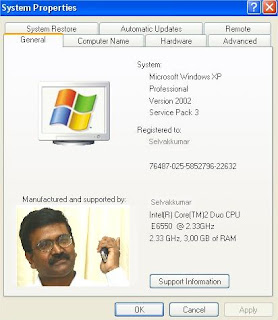
Open Note Pad
Type the following lines as instructed.
- [General]
- Manufacturer=Your Name Here
- [Support Information]
- Line1=Your Name Here
- Line2=Your Address Here
- Line3=Your Email Address Here
Step 2
Use Paint Or visit picresize.com
Change your photo to 180 x 120 pixels
Save your photo as "oemlogo.bmp"
Save or copy in 'C:\Windows\System32" folder

Sunday, May 3, 2009
Trick to chat with multiple accounts in GTalk
Create a Desk top short cut for GTalk
Right click on the GTalk short cut
Click properties

Select Shortcut Tab
In the target box change '/startmenu' as '-nomutex'


Click Apply and OK.
That's it! Now you can use GTalk with multiple accounts.
Sunday, April 12, 2009
Suggest me an online tool to convert 'gif' image to 'jpg'
Visit http://www.zamzar.com/
In two clicks you can convert files from one format to another
It gives variety of convertion options like . . .
In two clicks you can convert files from one format to another
It gives variety of convertion options like . . .
- Image formats
- Document formats
- Audio formats
- Video formats
- Other formats like (zip, cab etc,.)
Can I insert 'Photos' in Gmail? (Without using attachment link)
It's a new facility in GMail.
- Login GMail
- Click settings->Labs
- Scroll down to inserting images
- Click enable

From now on when you compose a mail in GMail, you will get this 'Insert Image' option.
Friday, January 2, 2009
No clicks, No short cuts. Commands for GMail!
 Are you using GMail?
Then I have some interesting commands for you.
No Click, No short cut Keys! Just simple commands!
Type the following commands in search mail box.
- To see the inbox
in:inbox - To see the starred messages
in:starred - To see all chat conversations
in:chats - To see all sent mails
in:sent - To see the list of drafts
in:drafts - To see all blocked spam mails
in:spam - To see what is inside the bin
in:bin - To view all mails (from inbox, sent mails, spam mails & drafts)
in:all mail
Subscribe to:
Posts (Atom)

